A notification bar is one of the most powerful aspects of your WordPress website to showcase a flash sale, share a limited-time coupon, make a product announcement, nudge visitors toward a specific action & more, but designing one from scratch takes time. Here comes the AI. You can design a notificatie balk with AI without any design experience in seconds using the AI-powered notification bar builder of NotificationX.
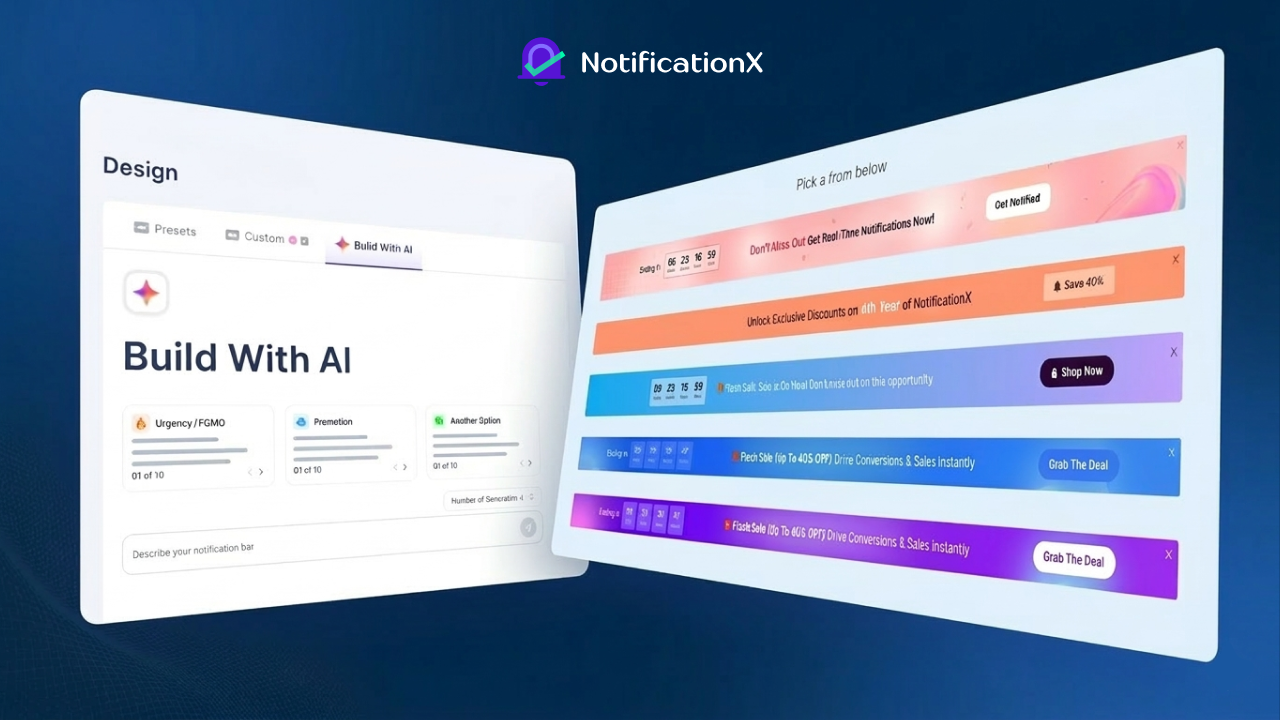
In this guide, we will walk you through everything: what the feature does, how to set it up step by step, and the real-world use cases where it can make a meaningful difference for your business.
What Is the AI Notification Bar Feature in NotificationX?
Kennisgeving X is a popular social proof and marketing plugin used by thousands of website owners to display social proof notifications, sales alerts, countdown timers and announcement bars. Its latest AI-powered feature takes the design process one step further.
Instead of manually choosing layouts and tweaking styles, you can now describe what kind of notification bar you need and let AI generate the design and copy for you. The AI draws from a library of categorized prompts that cover everything from discount announcements to event promotions and more. You will get ready-to-publish notification bars that align with your goals.
The result? You spend less time designing and more time converting visitors into customers.
Who Should Use This Feature?
The AI notification bar builder is ideal for:
- eCommerce store owners who want to promote flash sales, seasonal discounts, or new product launches without spending hours on design.
- Course creators and educators running platforms on Tutor LMS, LearnDash, or LearnPress, who want to announce enrollment deadlines or special offers.
- Bloggers and content creators who need a quick way to highlight new content, newsletter signups, or affiliate promotions.
- Agencies and freelancers who manage multiple WordPress sites and need to spin up notification bars quickly for clients.
- SaaS and digital product businesses that want to display urgency-driven offers, free trial announcements, or product update alerts.
Basically, if you have something important to say and you want your website visitors to see it immediately, this feature is for you.
Step-by-Step Guide: How to Design a Notification Bar with AI in NotificationX
Before you get started, make sure you have both versions of NotificationX installed and activated on your WordPress site:
- NotificationX Free Version (available on the WordPress plugin directory)
- NotificationX PRO Version (required for advanced features, including AI-powered design)
Once both are active, you are ready to go.
Add a New Notification
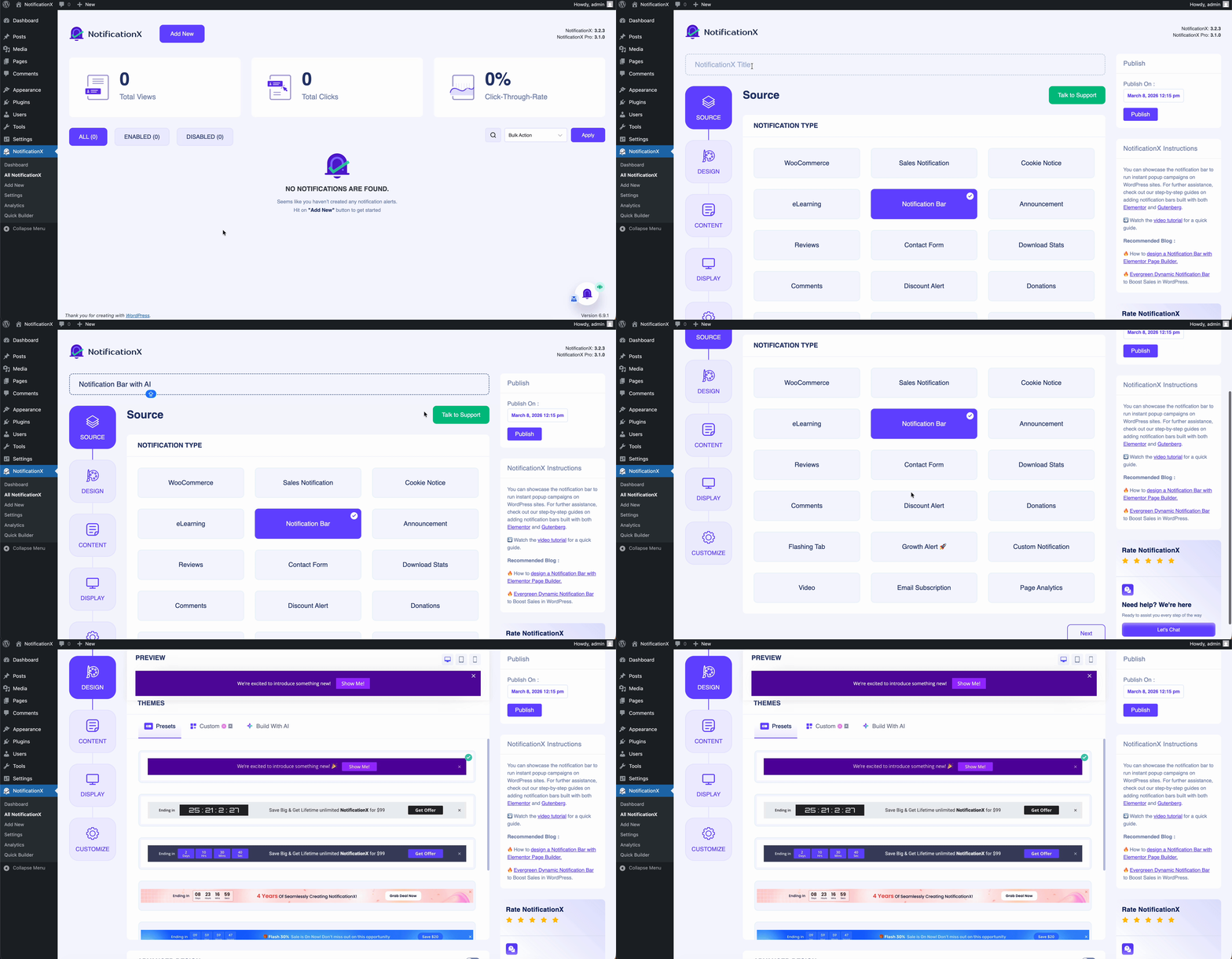
Log in to your WordPress Dashboard en navigeer naar NotificationX → Alle NotificationX. At the top of the page, click the “Add New” button. Alternatively, you can access the same option directly from the left-hand sidebar under NotificationX.
This opens the notification creation wizard, which walks you through a series of tabs: Source, Design, Content, Display and Customize.
Select “Notification Bar” as Your Notification Type
You will land on the Bron tab first. Here, give your notification a title. Something descriptive like “Summer Sale Announcement Bar” of “Black Friday Countdown Bar” so you can easily identify it later.
Next, scroll through the available notification types and select Notificatie balk. Once selected, click the “Next” button to proceed to the Ontwerp tabblad.
Design Your Notification Bar with AI
This is where the magic happens.
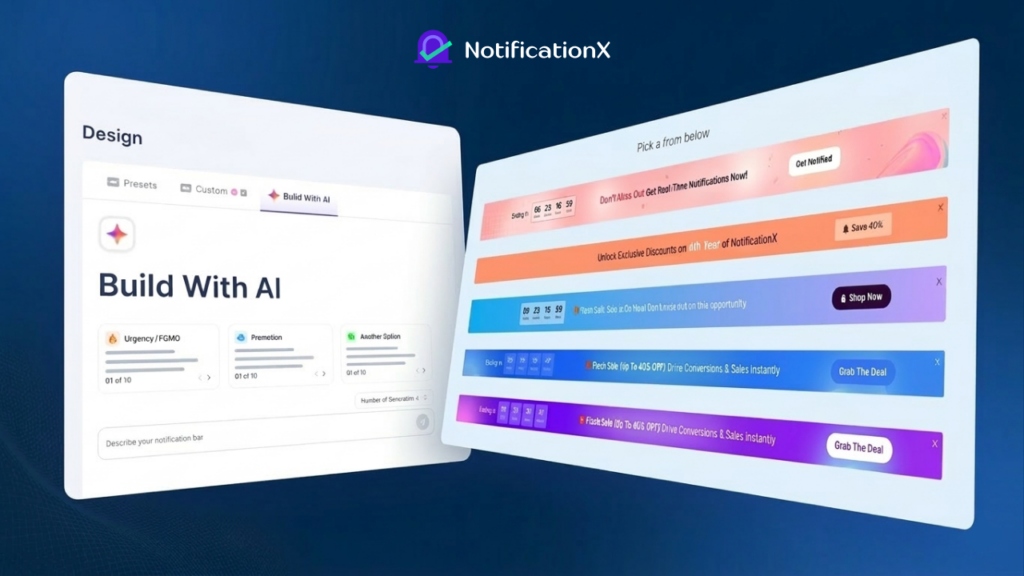
On the Ontwerp tab, you will see a selection of premade layouts that you can choose from. A live preview at the top of the screen shows you exactly how the bar will look on your website.
But instead of manually selecting and styling a layout, click the “Build with AI” button. This launches the AI design interface and from this point, the AI takes over the heavy lifting.
How the AI Interface Works
Inside the AI builder, you will find:
- Multiple notification bar categories — such as Sales & Discounts, Announcements, Events, Urgency, Seasonal Promotions, and more.
- 10 ready-made prompts for each category — giving you a wide range of starting points without having to write anything from scratch.
Here is how to use it:
- Pick a category that matches your goal (e.g., “Sales & Discounts” for a coupon campaign).
- Browse the prompts and click “Insert” on the one that fits your needs.
- Set the number of generations — you can ask the AI to produce multiple variations at once.
- Optionally edit the prompt before generating, if you want to customize the message, tone, or specific details.
- Click the generate icon and let the AI create your notification bar designs.
The AI will produce several design options based on your prompt. A preview of each option is shown so you can compare them at a glance. Simply click on the one you want to move forward with, and the preview at the top of the page will update to reflect your selection.
Fine-Tuning with Advanced Design
Once you have selected an AI-generated design, you can refine it further using the Geavanceerd ontwerp section:
- Background & Text Colors — choose custom colors or upload a background image to match your brand.
- Button Colors — customize the background and text color of any CTA buttons in the bar.
- Close Button — choose the color, size, and position of the close icon.
- Countdown Timer Colors — if your bar includes a countdown, style the timer separately.
- Link Button Typography — adjust font size and color for any hyperlinked text.
- Custom CSS — for developers or advanced users who want pixel-perfect control beyond what the UI offers.
When you are happy with the design, you can proceed with content & other settings.
👉 Learn more: How to Design a Notification Bar with AI Using NotificationX?
Real-World Use Cases for AI-Designed Notification Bars
Understanding how to set up the feature is one thing, but knowing when and how to use it strategically is what truly drives results. Here are some of the most impactful use cases:
1. Flash Sale Announcements
Running a 24-hour or weekend sale? A notification bar with a countdown timer creates immediate urgency. The AI can generate compelling copy like “24-Hour Flash Sale — 30% Off Sitewide. Ends Tonight!” combined with a bright, attention-grabbing design, in seconds.
2. Coupon Code Campaigns
Instead of burying coupon codes in emails or blog posts, surface them directly on your website. The auto-copy coupon feature removes the manual step of copying and pasting, making it easier for visitors to claim their discount, which directly improves conversion rates.
3. Product Launch Announcements
Launching a new product, course, or service? Use a notification bar to build anticipation and drive traffic to the launch page. Combine it with a countdown to the launch date for extra impact.
4. Event Promotions
Webinars, live sessions, conferences, or community events, a notification bar keeps the event top-of-mind for every visitor. Set it to disappear after the event date using the countdown and auto-hide features.
5. Seasonal and Holiday Campaigns
Black Friday, Cyber Monday, Christmas, Eid, New Year, every seasonal campaign benefits from a bold, themed notification bar. The AI’s category-based prompts include seasonal options, so you can generate holiday-appropriate designs quickly.
6. Email Newsletter Signups
Use the notification bar to drive visitors to your newsletter signup page with a compelling incentive (“Subscribe today and get 15% off your first order”). Pair it with a button that links directly to the signup form.
7. Free Trial or Demo Offers
For SaaS companies or digital product sellers, a notification bar promoting a free trial or product demo is a low-friction way to move visitors further down the funnel.
8. Shipping And Policy Announcements
Notify customers about free shipping thresholds, delivery delays, policy changes, or returns updates. These informational bars build trust and reduce customer support queries.
9. Targeted Regional Promotions
Using the geo-targeting feature, you can show different notification bars to visitors from different countries. For example, show a USD-based offer to US visitors and a GBP-based offer to UK visitors — all from the same WordPress install.
10. GDPR and Cookie Consent Notices
Beyond promotions, notification bars are also widely used for compliance purposes. NotificationX supports GDPR cookie consent bars, which can be designed just as quickly using the AI builder.
Why Use AI for Notification Bar Design?
The traditional approach to building a notification bar involves several manual steps: choosing a template, adjusting colors to match your brand, writing copy, testing different variations and publishing. For busy website owners and marketing teams, this process eats into valuable time.
The AI builder collapses this entire process into a matter of seconds. Here is what makes it particularly useful:
- Speed — go from idea to a published notification bar in under five minutes.
- Variety — generate multiple design variations and pick the best one rather than committing to a single design upfront.
- Creativity on demand — the AI produces copy and design combinations you might not have thought of yourself, expanding your creative options.
- Consistency — the advanced design tools ensure the generated bar can be tweaked to match your brand’s exact colors and typography.
- Reduced dependency on designers — small teams and solo entrepreneurs can produce professional-quality notification bars without hiring a designer.
Tips for Getting the Most Out of the AI Notification Bar Builder
- Be specific with your prompts. The more context you give the AI, like product name, offer percentage, deadline and target audience, the more tailored the output will be.
- Generate multiple variations. Set the number of generations to 3 or more and compare the results before committing to one.
- Use Advanced Design to align with your brand. The AI handles the heavy lifting, but a few color tweaks can make the bar feel native to your website rather than generic.
- Combine with the Countdown Timer for time-sensitive campaigns. Urgency is one of the strongest motivators in marketing. So, you need to use it intentionally.
- Test different Bar Reappearance settings. For high-priority campaigns, showing the bar on every page visit may be appropriate. For general announcements, once per session is usually enough.
- Use Geo-Targeting for international audiences. Personalizing the notification based on location significantly improves relevance and click-through rates.
Design Your Website Bar with AI & Attract Customers Instantly
The Build with AI feature, while creating a notification bar, is a genuinely useful tool for anyone running a WordPress website. It removes the friction from the design process, gives you a variety of creative options instantly, and pairs beautifully with the plugin’s already robust feature set: countdown timers, coupon codes, geo-targeting, sticky bars and more.
Whether you are running a one-person blog or managing a busy eCommerce store, this feature helps you communicate more effectively with your visitors, create urgency around your offers, and ultimately drive more conversions, all without spending hours in a design tool.
Frequently Asked Questions (FAQs)
1. What is an AI notification bar in NotificationX?
An AI notification bar in Kennisgeving X is a feature that automatically generates notification bar designs and copy based on a simple prompt. Instead of manually creating layouts and writing messages, you can describe your campaign and let AI produce ready-to-publish notification bars in seconds.
2. Do I need coding skills to design a notification bar with AI?
No, coding skills are not required. The AI builder in Kennisgeving X is designed for beginners and non-technical users. You simply choose a category, select a prompt, generate design options, and customize them using built-in visual settings.
3. Is the AI notification bar feature available in the free version of NotificationX?
The AI notification bar builder is available in the Pro-versie of Kennisgeving X. The free version provides basic notification features, but advanced capabilities like AI-generated designs require NotificationX Pro.
4. Can I customize the notification bar after AI generates it?
Yes. After the AI generates your notification bar, you can fully customize it. You can adjust colors, typography, button styles, countdown timers, backgrounds, and even add custom CSS to match your website’s branding.
5. Can I display different notification bars for different users?
Yes. Kennisgeving X allows advanced targeting options. You can display notification bars based on user roles, geographic location, specific pages, or visitor behavior to make your campaigns more relevant.
6. What types of campaigns work best with notification bars?
Notification bars work particularly well for:
Flash sales and limited-time offers
Coupon code promotions
Product launches
Webinar or event announcements
Free trial or demo promotions
Newsletter signup campaigns
These use cases help capture visitor attention quickly and increase conversions.
7. Can I add a countdown timer to my notification bar?
Yes. Kennisgeving X supports countdown timers, including evergreen timers that reset for each visitor. Countdown timers create urgency and encourage users to take action before the offer expires.
8. Where can a notification bar appear on my website?
A notification bar can appear either at the top or the bottom of your website. With NotificationX, you can also enable a sticky bar, so it stays visible while visitors scroll through the page.
9. Will the notification bar slow down my WordPress website?
No. Kennisgeving X is optimized for performance and designed to work smoothly with most WordPress themes and plugins. Proper configuration ensures minimal impact on website speed.
10. Why should I use AI to design a notification bar?
Using AI saves time and improves creativity. Instead of manually designing a bar and writing copy, AI can generate multiple design variations instantly. This helps website owners launch campaigns faster while still maintaining professional-quality designs.
Subscribe to our blogs & sluit je aan bij onze gemeenschap to know more tips and tricks about marketing your product and brand. Everything is now AI-powered & you’d better be on the same page.

 English
  Arabic
  Indonesian
  Spanish
  Bengali
  Portuguese
  German
  Dutch
Dutch  Russian
  Hindi
Hindi  French
  Japanese
  Chinese
  Vietnamese
  Malay
Malay