
A visitor is just about to leave your website, and in that exact moment, you still have one last chance to grab their attention. That is where exit intent becomes powerful. Instead of losing potential leads, sales, or signups silently, you can show a well-timed message that encourages visitors to stay, act, or come back later.
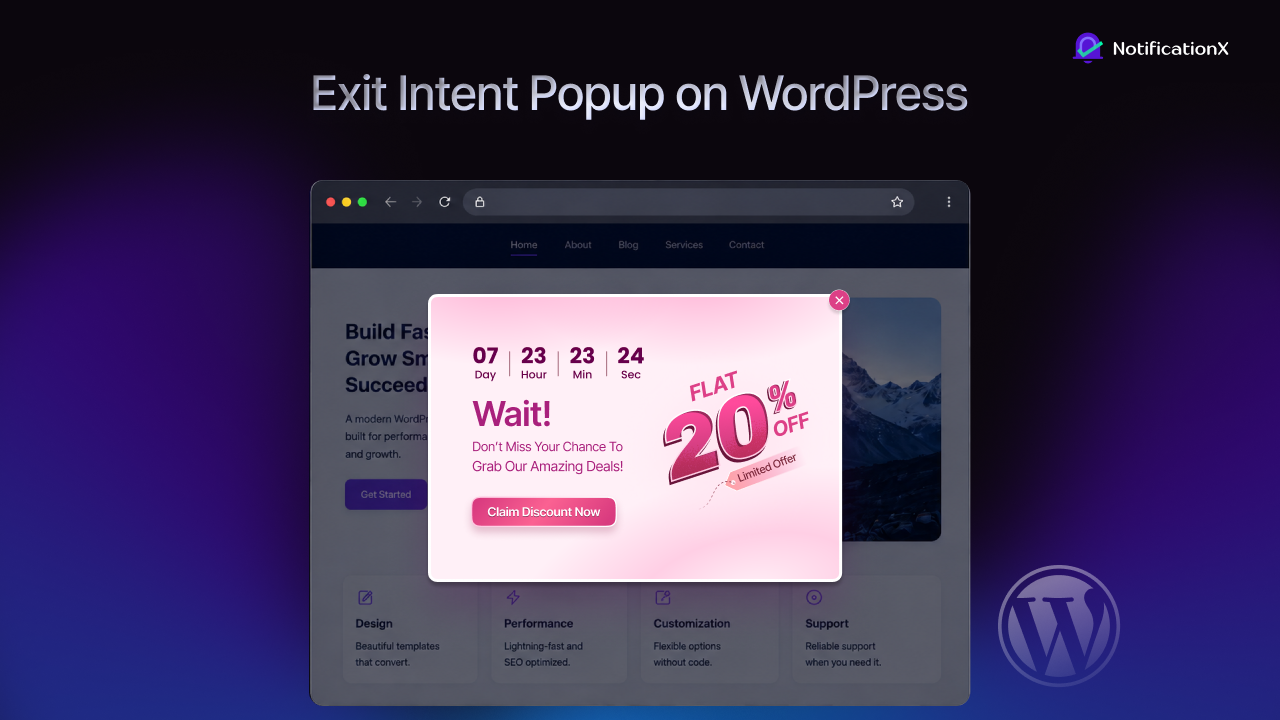
For marketers and business professionals, an exit intent popup is not just another on-site message. It is a practical conversion tool that helps you turn abandonment into opportunity. And if you use WordPress, setting up an exit intent popup on a WordPress website is much easier now, especially with solutions like NotificationX that let you design, customize, and control when the popup appears.
What Is an Exit Intent Popup?
If you have ever wondered what an exit intent pop-up is, the answer is simple: it is a popup that appears when a visitor shows signs of leaving your website. Usually, it is triggered when the user moves the cursor toward the browser bar or close button area, signaling possible exit behavior. The goal is to stop that exit with a relevant message, offer, or reminder. Instead of interrupting visitors during their browsing journey, exit intent technology waits until they show signs of leaving, making the interaction feel more timely and contextual.
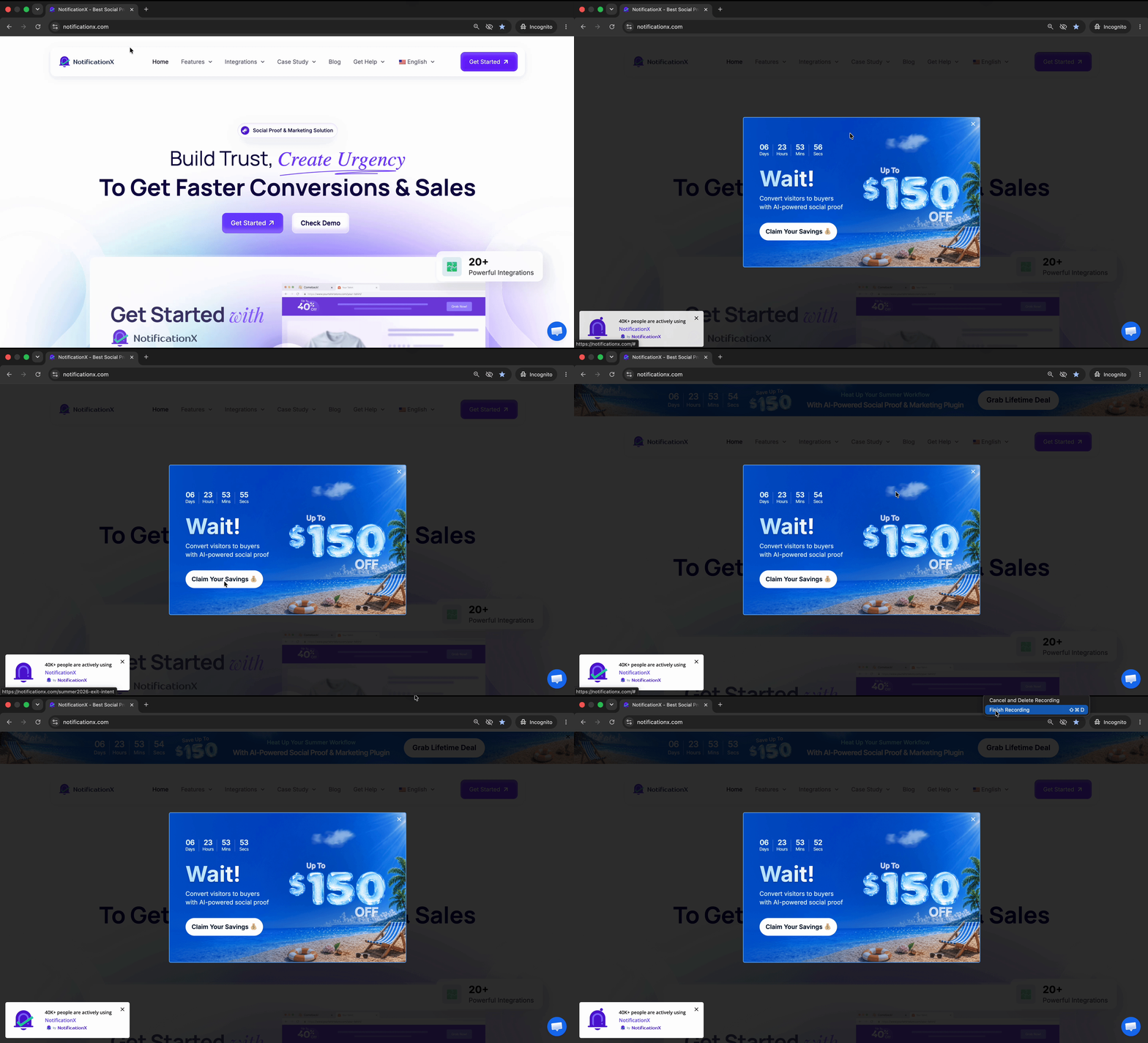
A few simple exit intent popup examples include offering a discount before a shopper leaves a product page, showing a lead magnet before a blog reader exits, or displaying a demo request form when a B2B buyer is about to abandon a pricing page. In NotificationX, this feature is designed to bring visitors back into your funnel by displaying sales messages, discounts, or urgent announcements before they leave.
Why Is Exit Intent Popup Important on a WordPress Website?
Before diving into the reasons, consider this: most visitors who leave your website never return. Whether they are comparing options, getting distracted, or simply not ready to take action, every exit represents a missed opportunity. An exit intent popup gives you one last chance to engage those visitors at the exact moment they are about to leave. When used strategically, it can turn abandoning visitors into subscribers, leads and customers.
Reduce Bounce Rates
Many visitors leave without taking any action, even when they were interested for a moment. An exit intent popup gives you one last opportunity to present something useful before they disappear. For example, a blog reader about to leave can see a popup offering a free checklist in exchange for their email.
Recover Lost Sales
Not every buyer leaves because they are not interested. Sometimes they just need a small push. A timely popup with a discount code, free shipping reminder, or bonus offer can help recover hesitant shoppers. For example, an eCommerce store can show a 10% off coupon right before a user exits the cart page.
Capture More Leads
Lead generation is one of the strongest use cases for this type of popups. Instead of letting traffic go to waste, you can convert visitors into subscribers, prospects, or demo leads. For example, a SaaS website can show a popup offering a free consultation to someone leaving the features page.
Highlight Key Offers
Visitors often miss your most important announcement because they scroll fast or get distracted. Exit popups can spotlight a campaign at the right moment. For example, if you are running a limited-time webinar registration, the popup can remind users before they leave the site.
Improve Visitor Engagement
Sometimes the best goal is not immediate conversion but deeper engagement. An exit popup can guide users to another useful page, related article, or resource hub. For example, an agency website can recommend a case study to a visitor who is about to leave the homepage.
Now that you understand why exit intent popups matter, the next question is how to implement them effectively on WordPress without relying on complex custom development. NotificationX brings a no-coding solution for you!
Introducing Exit Intent Popup by NotificationX
Exit Intent Popup by NotificationX gives WordPress users a much more practical way to recover abandoned visitors without turning popup creation into a technical project. Instead of juggling multiple settings across different tools, you can build the whole popup from one guided workflow inside your WordPress dashboard:
- Create a new notification,
- Choose Exit Intent Popup as the source
- Pick a theme, customize the design
- Add your content
- control where it appears
- Publish it live.
Users can choose from free and Pro themes, enable تصميم متقدم and fine-tune elements like background color, overlay color, popup width, close button color, typography, message color, and button styling.
On top of that, you can customize actual popup content such as video thumbnail, badge text, headline, subtitle, and video URL, which makes the feature useful for promotions, lead capture, product offers, and urgent announcements.
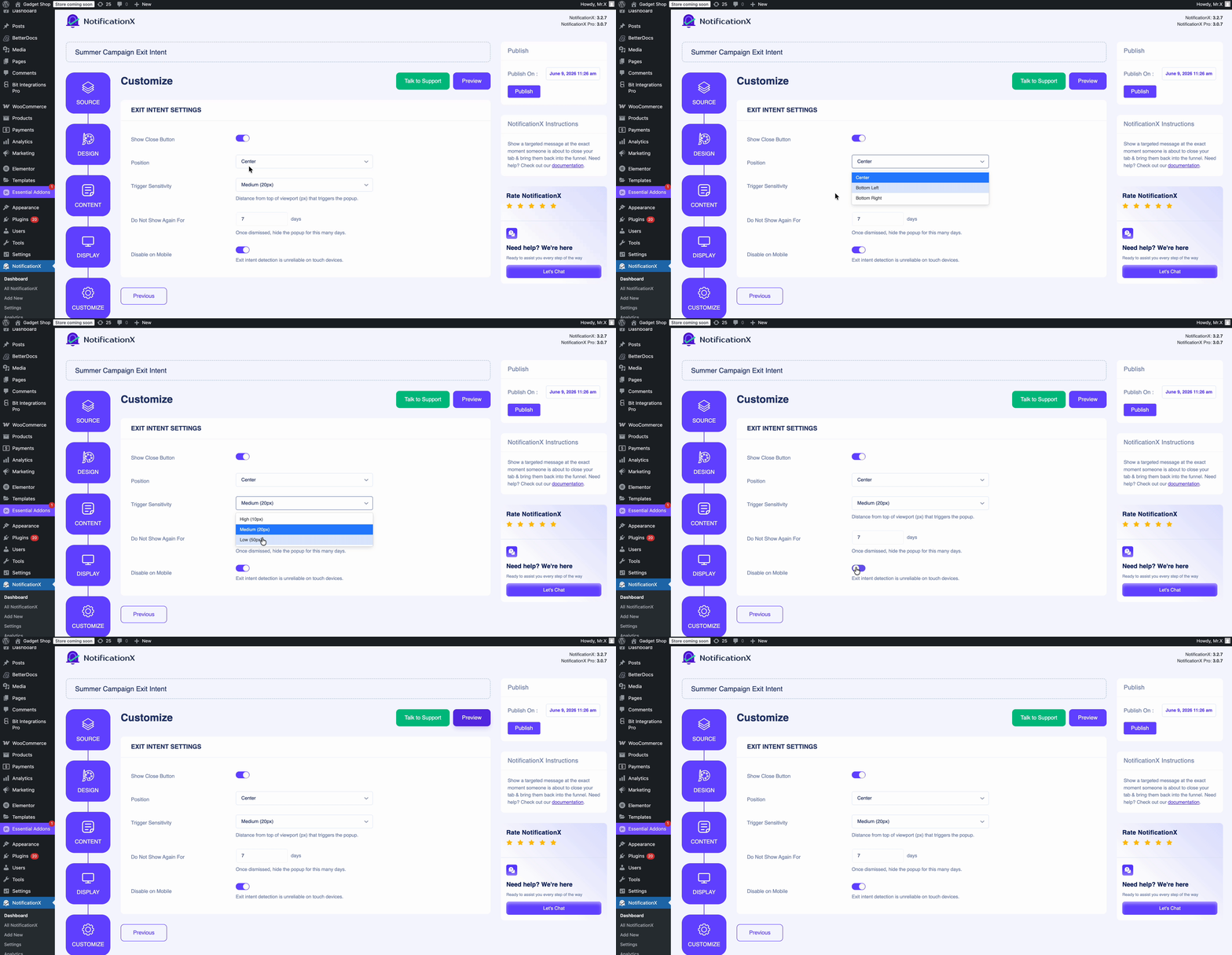
What makes this a stronger solution than many basic popup options is the amount of control it gives users without making the process harder. NotificationX does not stop at design; it also lets you manage visibility, audience targeting, popup position, trigger sensitivity, mobile visibility and display timing before publishing. That means marketers and business owners can create exit intent popups that are not only attractive, but also better timed and more relevant to the visitor. This makes campaign setup easier, reduces dependence on extra customization work, and helps users launch conversion-focused popups faster.
NotificationX also highlights customizable notifications with العنصر, making it a more flexible choice for users who want compatibility alongside conversion-focused features.
How to Show Exit Intent Popup in WordPress with NotificationX?
If you want to set up an exit intent on your WordPress website without making it feel complicated, here is the easy version.
ملحوظة: Before getting started, make sure you have تثبيت وتنشيط NotificationX on your WordPress website.
Step 1: Create a New Notification
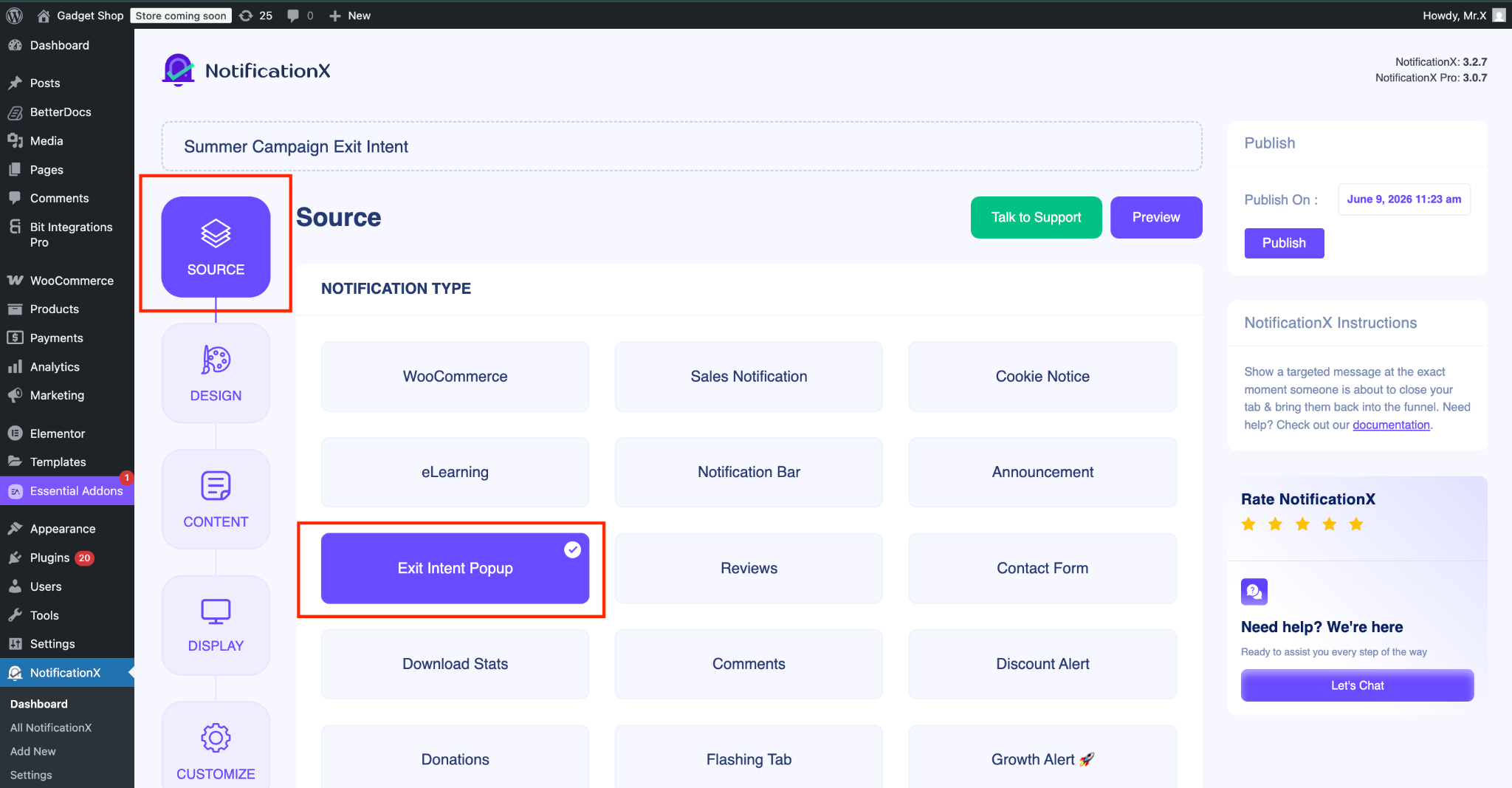
First, go to your WordPress dashboard and open NotificationX. Hit Add New, give it a title if you want, and choose “Exit Intent Popup” as the source type. That is basically where the whole setup starts.
Step 2: Pick a Design That Matches Your Brand
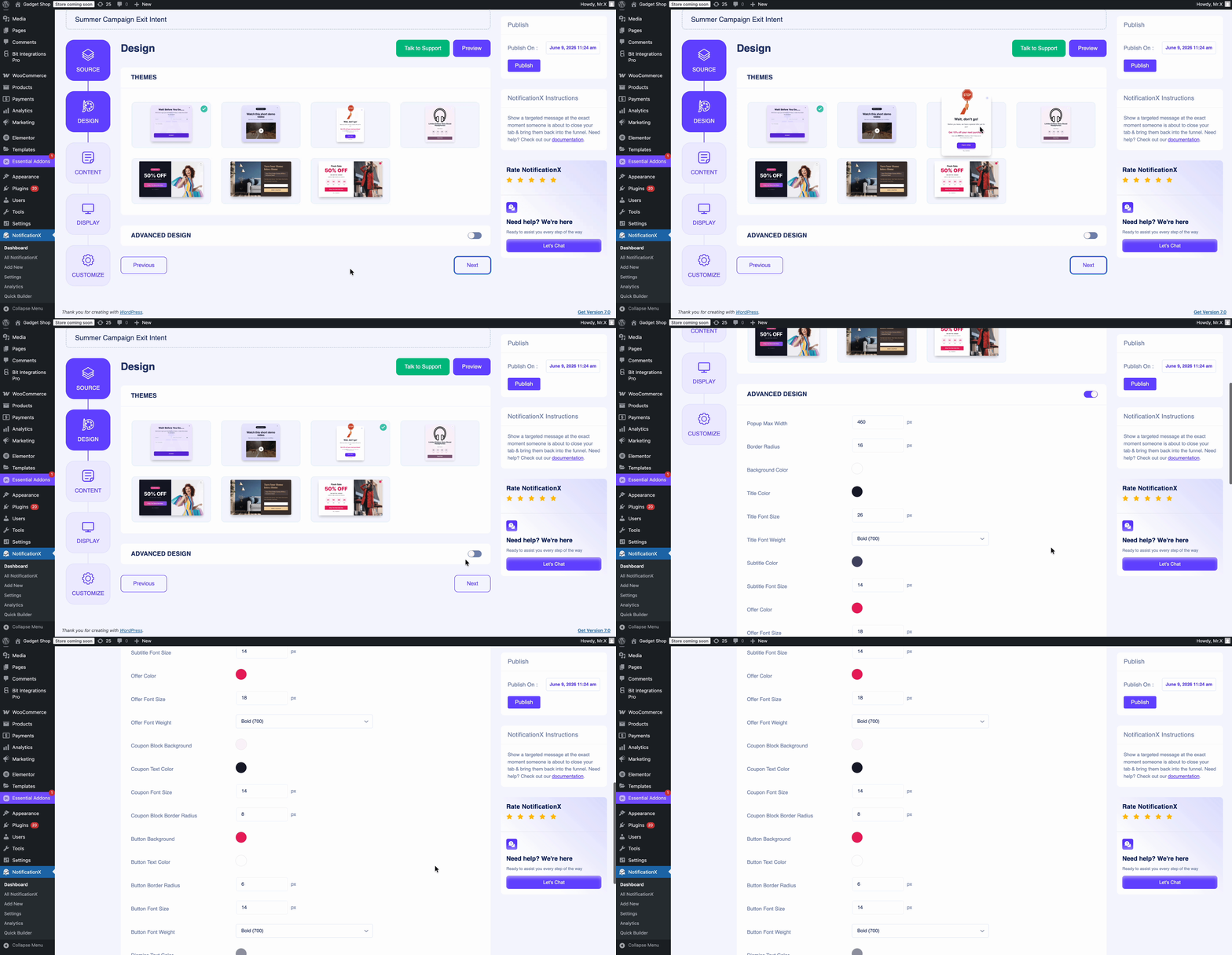
Now comes the fun part. Head over to the 'تصميم' tab and choose a theme. NotificationX offers free and pro theme options, and you can also turn on ‘التصميم المتقدم if you want more control over colors, overlay background, width, typography, button style, and close button color. So yes, you do not have to settle for a boring popup.
Step 3: Add Content
Now it is time to fill your popup with the actual message you want visitors to see. In NotificationX, the Content tab lets you customize important elements like the video thumbnail, badge text, headline, subtitle, and video URL. This gives you enough flexibility to create a popup that feels relevant to your campaign instead of looking generic.
Step 4: Control Visibility
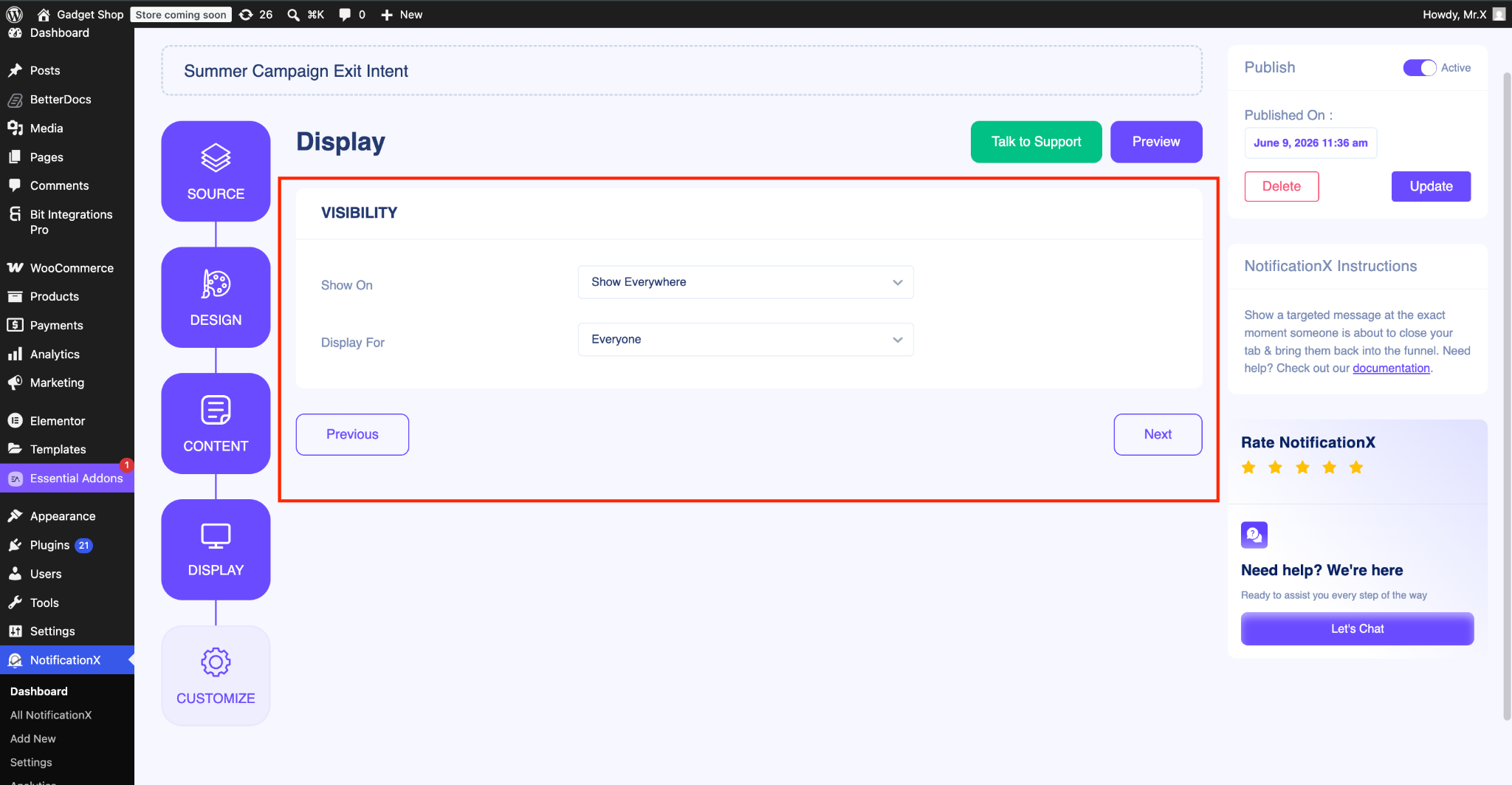
Once your content is ready, the next job is deciding where, when, and to whom the popup should appear. From the Display tab, NotificationX lets you control the visibility settings so you can choose where to show or hide the exit intent popup on your website. You can also define the audience for this notification, which helps you avoid showing the same message to everyone.
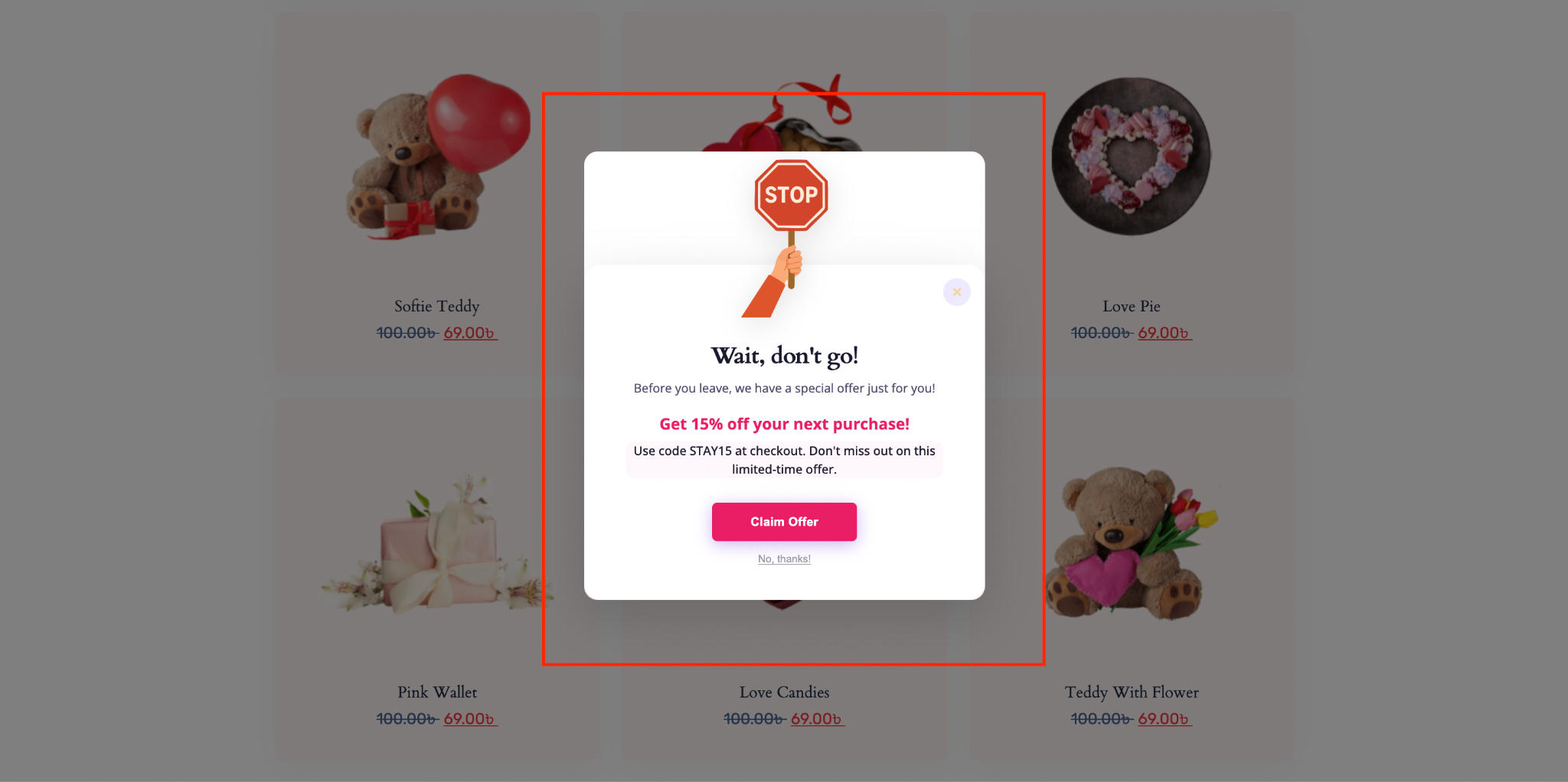
Once published, your popup will automatically appear when visitors show exit behavior based on the conditions you configured. Whether you are promoting a discount, collecting leads, or highlighting a campaign, you now have a conversion-focused opportunity to engage users before they leave.
To get more detailed information, check the documentation.
Common Mistakes to Avoid While Implementing Exit Intent Popup
Even though after creating a stunning popup, some common mistakes can be the bottleneck for generating conversions on your website. Some of the mistakes are explained in detail here:
Showing the Popup Too Early
One of the biggest mistakes is triggering the popup before visitors have had enough time to understand your page, offer, or brand. If an exit intent popup appears too quickly, it can feel disruptive rather than helpful, especially for first-time visitors who are still exploring your website. Instead of improving conversions, this often creates frustration and increases the chances of bounce. For example, if someone lands on a product page and sees a popup almost immediately, they may close both the popup and the page without even reviewing the offer.
Using a Weak Offer
Many websites fail with exit intent popups because they ask users to stay or sign up without giving them a strong reason to do so. A generic message like “Wait, don’t leave” is rarely enough to change behavior. Visitors are much more likely to respond when the popup offers something valuable, such as a discount, a free resource, a free consultation, or exclusive access. For instance, an eCommerce site offering 10% off for first-time buyers will usually perform far better than a popup that simply asks users to subscribe with no clear benefit.
Writing Unclear Copy
Even if your timing is right and your design looks good, weak messaging can still ruin the popup’s performance. If the headline is vague, the subtitle is too long, or the call-to-action is confusing, visitors may not understand what they are supposed to do next. An effective exit intent popup should communicate the value instantly. For example, “Get Your Free SEO Checklist Now” is much clearer and more action-driven than “Learn More About Our Resources.” The simpler and more specific the message is, the easier it becomes for visitors to make a decision.
Ignoring Audience Targeting
Another common mistake is showing the same popup to every visitor, regardless of where they are on the site or what their intent might be. Not all users are at the same stage of the journey. A visitor leaving a blog page may respond well to a newsletter signup, while a visitor leaving the checkout page may need a discount or free shipping offer. Without proper targeting, your popup can feel irrelevant and reduce its effectiveness. The more aligned the message is with the page and user behavior, the better the chances of conversion.
Neglecting Mobile Experience
A popup that works well on desktop may perform poorly on mobile if it is not properly controlled. If the popup takes up too much screen space, appears awkwardly, or interrupts the browsing experience on smaller devices, users may leave immediately. Since many websites now receive a significant amount of mobile traffic, this can hurt both user experience and conversion potential. That is why it is important to think about mobile visibility, layout, and timing carefully when setting up your exit intent popup WordPress strategy. A popup should feel optimized for the device, not forced onto it.
Best Time to Use Exit Intent Popups on Your WordPress Website
Exit intent popups can become frustrating when they are shown without a clear strategy or relevant offer. Best practice is to use it in a way that focuses only on boosting the conversion rate on your website. Here are some of the best situations where this feature can help you to turn your visitors into customers.
During Cart Abandonment
When a shopper is about to leave the cart or checkout page, show a discount, free shipping offer, or urgency-based reminder.
مثال: “Complete your order now and get free shipping today.”
After Blog Engagement
If someone has spent time reading your content but leaves without subscribing, offer them a downloadable resource or a newsletter sign-up.
مثال: A reader finishes an SEO article and sees a popup offering a free keyword research template.
On Pricing Pages
Visitors on pricing pages are usually evaluating seriously. If they are about to leave, that is a great moment to offer a demo, consultation, or FAQ guide.
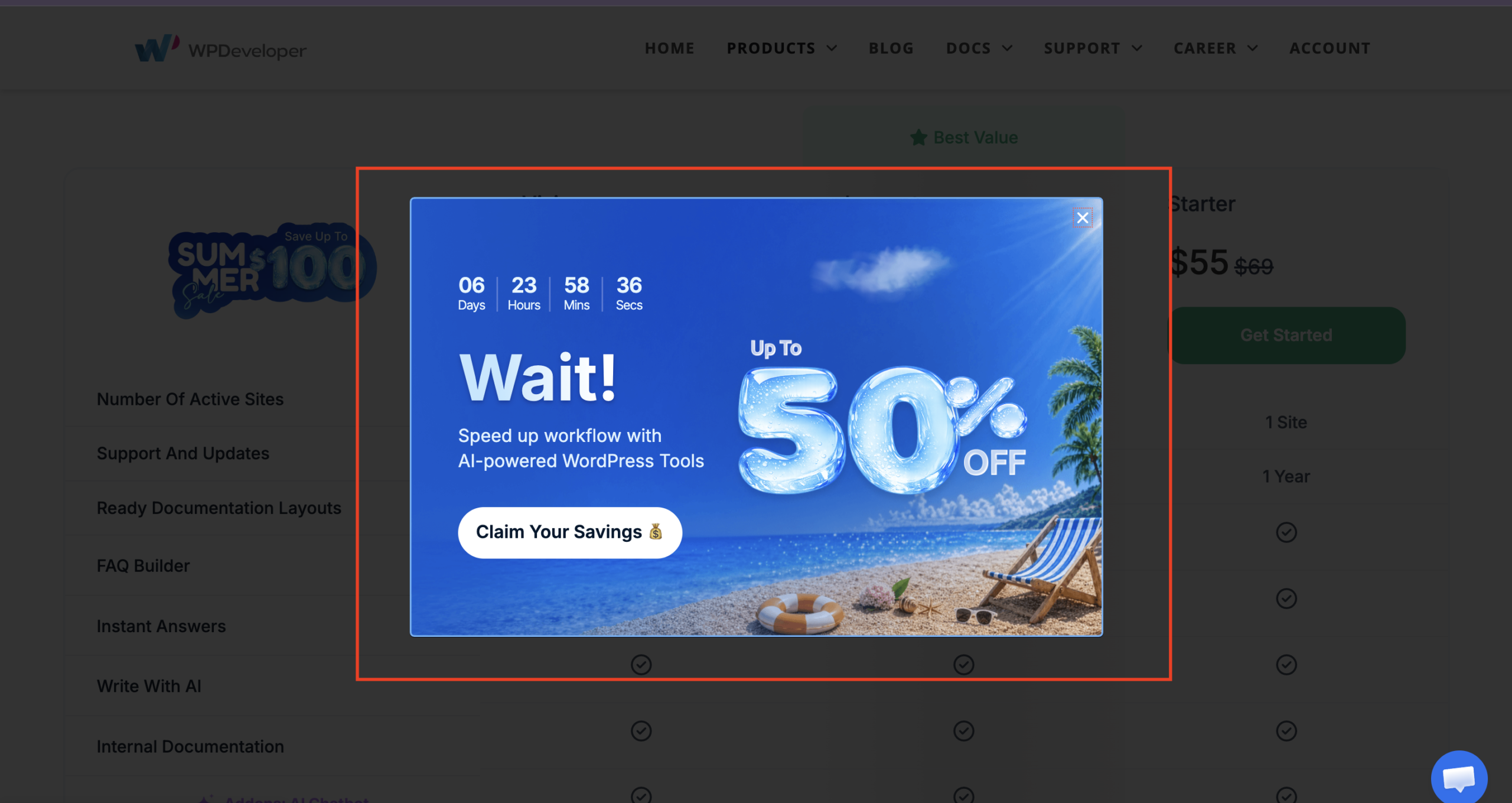
مثال: “Still comparing options? Book a 15-minute walkthrough.”
During Campaign Launches
Running a seasonal promotion, webinar, or product launch? Use exit popups to ensure visitors do not miss them.
مثال: Before leaving, users see a popup about a limited-time Black Friday bundle.
Before Resource Exit
If users are leaving a landing page or resource page without taking action, recommend the next step.
مثال: A visitor leaving an ebook landing page sees a popup offering a related case study or product demo.
Best Practices for Higher-Converting Exit Intent Popups
A well-planned exit intent popup can do much more than simply stop visitors from leaving. When the message, offer, and timing work together, it becomes a powerful conversion tool. That is why following a few proven best practices can make a big difference in performance.
- Offer genuine value: Give visitors a real reason to stay or take action, such as a discount, free resource, exclusive deal, or useful consultation.
- Keep copy concise: Your message should be clear, direct and easy to understand within seconds. Long copy often reduces impact.
- Use a single CTA: Focus on one action only, whether it is subscribing, claiming an offer, booking a demo, or making a purchase.
- Match the offer to the page context: Make sure the popup connects to the page the visitor is leaving. A blog reader and a cart abandoner should not see the same message.
- A/B test headlines and offers: Test different headlines, incentives and CTA wording to see which combination drives more clicks and conversions.
- Avoid showing the popup repeatedly: If users keep seeing the same popup again and again, it can become annoying and hurt the browsing experience.
Turn Leaving Traffic Into Real Conversions
An effective exit intent popup is not about interrupting visitors for the sake of it. It is about meeting them at the last possible moment with something relevant, useful, and conversion-focused. Whether your goal is to capture leads, recover sales, promote offers, or guide users to the next step, these popups can play a valuable role in your WordPress conversion strategy.
If you are using WordPress and want a simple way to implement it, NotificationX gives you a practical setup process with design, content, visibility and trigger controls built in. Start with one smart use case, test your message, and turn more exits into opportunities. Was this blog helpful? Do not forget to اشترك في مدونتنا. If you want to discuss more marketing talk, then join our مجتمع Facebook today.




 English
  Arabic
  Indonesian
  Spanish
  Portuguese
  German
  Dutch
Dutch  Russian
  Hindi
Hindi  French
  Japanese
  Chinese
  Vietnamese
  Malay
Malay